The UNESCO ICT-CFT Matrix Explained
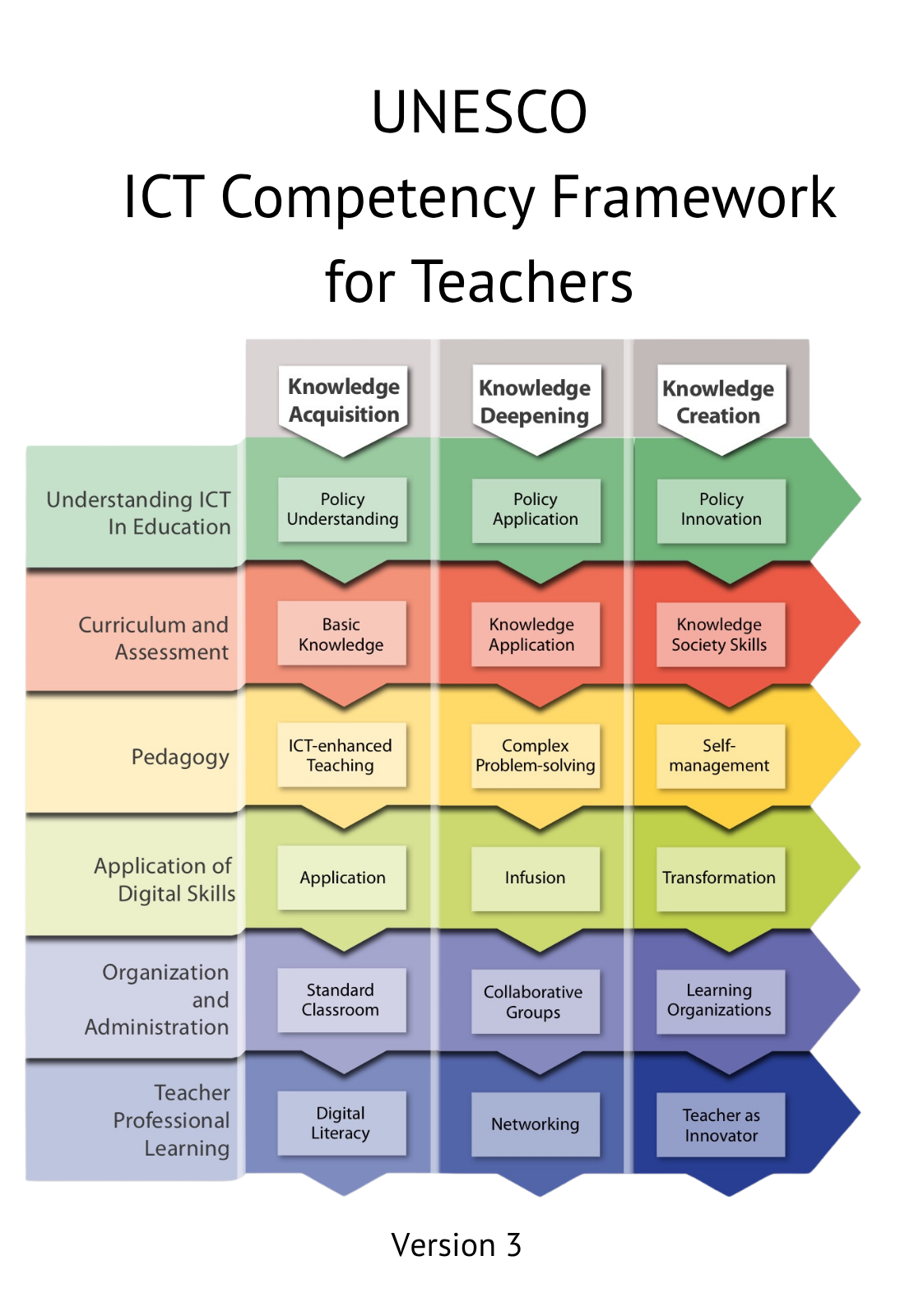
- The UNESCO ICT-CFT matrix combines three levels of teacher development with six aspects of teachers’ professional work.
- The three levels are Knowledge Acquisition, Knowledge Deepening, and Knowledge Creation.
- The six aspects are Understanding ICT in Education Policy, Curriculum and Assessment, Pedagogy, Application of Digital Skills, Organisation and Administration, and Teacher Professional Learning.
- The matrix creates 18 competency areas, but it should be understood as a developmental framework, not a mechanical checklist.
- Teachers may be at different levels in different aspects. For example, a teacher may be confident in digital skills but still developing in ICT-supported assessment.
- The matrix helps teachers, teacher educators, school leaders, and policy planners connect ICT use with educational goals.
- ICT should serve pedagogy, curriculum, assessment, inclusion, and professional learning; it should not be treated as an end in itself.
Introduction
The UNESCO ICT Competency Framework for Teachers, also called UNESCO ICT-CFT, is often represented as a matrix. This matrix is one of the most useful parts of the framework because it shows that ICT integration is not a single skill. It is a combination of knowledge, practice, planning, pedagogy, assessment, organisation, and professional learning.
A teacher may know how to use a computer but still need support in designing ICT-based assessment. Another teacher may use digital presentations confidently but may not yet use ICT for collaboration, problem-solving, student creativity, or professional networking. A third teacher may use ICT innovatively in lessons but may still need to understand how classroom technology use connects with school or national ICT policy.
The matrix helps teachers see this complexity in a structured way.
UNESCO ICT-CFT Version 3 is officially described as a tool to guide pre-service and in-service teacher training on the use of ICT across the education system. UNESCO also explains that the framework is intended to be adapted to support national and institutional goals, especially for policy development and capacity building in teacher education.
This article explains the matrix in detail. It shows how the three levels and six aspects work together, why the matrix is not just a checklist, and how teachers can use it for reflection and improvement.
What Is the UNESCO ICT-CFT Matrix?
A matrix is a table that shows relationships between two sets of categories. In the UNESCO ICT-CFT, one side of the matrix shows three levels of teacher development, while the other side shows six aspects of teachers’ professional practice.
The three levels describe the broad purpose and depth of ICT use:
- Knowledge Acquisition
- Knowledge Deepening
- Knowledge Creation
The six aspects describe important areas of a teacher’s work:
- Understanding ICT in Education Policy
- Curriculum and Assessment
- Pedagogy
- Application of Digital Skills
- Organisation and Administration
- Teacher Professional Learning
When these are combined, they create 18 areas of teacher competence. UNESCO’s Version 3 publication presents the ICT-CFT with these three levels and six aspects, including examples such as Basic Knowledge, Knowledge Application, ICT-improved Teaching, Digital Literacy, Standard Classroom, and Teacher as Innovator.
The 3 × 6 Matrix at a Glance
The table below provides a simplified teacher-friendly version of the UNESCO ICT-CFT matrix.
| UNESCO ICT-CFT Level | Understanding ICT in Education Policy | Curriculum and Assessment | Pedagogy | Application of Digital Skills | Organisation and Administration | Teacher Professional Learning |
|---|---|---|---|---|---|---|
| Knowledge Acquisition | Teachers understand basic ICT policy goals and how ICT supports access to education and standard curriculum delivery. | Teachers use ICT to support existing curriculum goals and basic assessment. | Teachers use ICT to improve instruction, explanation, practice, and classroom presentation. | Teachers develop basic digital literacy and help learners use common digital tools. | Teachers use ICT in standard classrooms for records, resources, presentation, and basic management. | Teachers use ICT to access basic training, resources, and professional information. |
| Knowledge Deepening | Teachers apply ICT policy goals to classroom practice and subject learning. | Teachers use ICT to support knowledge application, problem-solving, and more meaningful assessment. | Teachers design ICT-supported problem-solving, inquiry, collaboration, and project-based learning. | Teachers use subject-specific tools, data tools, communication tools, and collaborative platforms. | Teachers organise ICT-supported collaborative groups, projects, learning resources, and classroom routines. | Teachers use ICT to participate in professional networks, collaborative learning, and reflective practice. |
| Knowledge Creation | Teachers contribute to ICT policy innovation and school improvement. | Teachers support knowledge society skills, creativity, self-management, and learner-generated outcomes. | Teachers design learning environments where students create, publish, collaborate, and innovate. | Teachers use digital tools flexibly for creation, innovation, communication, and knowledge production. | Teachers help develop learning organisations that use ICT for continuous improvement. | Teachers act as innovators, knowledge creators, mentors, and lifelong learners. |
This table should not be memorised only as a set of terms. It should be understood as a map of professional growth. It helps teachers ask: Where am I now, and how can I develop further?
Understanding the Three Levels
The three levels show a progression in how ICT supports teaching and learning. They are not simply technical levels. They are educational levels.
Knowledge Acquisition
At the Knowledge Acquisition level, ICT is used to help teachers and students access information, present content, practise skills, and develop basic digital literacy.
A teacher working at this level may:
- use slides, videos, images, and projectors to explain content;
- prepare digital worksheets and handouts;
- use simple online quizzes;
- teach learners how to search for information responsibly;
- maintain digital attendance or marks records;
- use basic productivity tools such as word processors and spreadsheets.
This level is important because it provides the foundation for later development. Teachers and learners need basic confidence before they can use ICT for deeper learning.
However, Knowledge Acquisition should not be treated as the final goal. If ICT is used only for presentation or drill practice, it may improve efficiency but may not transform learning.
Knowledge Deepening
At the Knowledge Deepening level, ICT is used to help learners apply knowledge to real problems, analyse information, collaborate, investigate, and develop deeper understanding.
A teacher working at this level may:
- design project-based learning activities;
- use simulations to explore scientific concepts;
- ask students to collect and analyse data using spreadsheets;
- support group work through shared documents or online discussion spaces;
- use digital tools for formative assessment and feedback;
- connect classroom learning with real-world issues.
For example, students may use ICT to investigate water use in their community, analyse survey results, and present evidence-based recommendations. In this case, ICT is not only presenting information. It is supporting inquiry, problem-solving, and application.
Knowledge Creation
At the Knowledge Creation level, ICT is used to support innovation, creativity, learner autonomy, collaboration beyond the classroom, publishing, and professional knowledge building.
A teacher working at this level may:
- guide students in creating digital portfolios;
- help students publish blogs, videos, podcasts, reports, or multimedia projects;
- design inquiry projects where learners create new products or solutions;
- connect learners with experts, communities, or other classrooms;
- use ICT to support self-directed learning and reflection;
- contribute to teacher networks, open resources, or school innovation.
At this level, students are not only consumers of information. They become creators, collaborators, communicators, and problem-solvers.
UNESCO’s overview of the ICT-CFT notes that teachers need to be able to harness ICT to guide learners in developing knowledge society skills, including critical and innovative thinking, complex problem-solving, collaboration, and socio-emotional skills.
Understanding the Six Aspects
The six aspects show the areas of teachers’ professional work affected by ICT. They are important because ICT integration is not only about what happens during a lesson. It also involves policy, planning, assessment, management, and professional growth.
1. Understanding ICT in Education Policy
This aspect asks teachers to understand how ICT use connects with wider educational goals. These goals may relate to access, equity, quality education, curriculum reform, inclusion, digital citizenship, teacher development, and lifelong learning.
A teacher does not need to become a policy expert, but should understand why ICT is being introduced and how it supports educational priorities.
For example, if a school policy encourages inclusive education, the teacher may use ICT to provide accessible resources, audio support, captions, flexible assignments, or alternative ways for students to demonstrate learning.
2. Curriculum and Assessment
This aspect focuses on the relationship between ICT, learning outcomes, curriculum content, and assessment.
Teachers should ask:
- What learning outcome am I trying to achieve?
- Does ICT help learners reach this outcome?
- How can ICT support formative assessment?
- How can digital tools provide feedback?
- Can learners demonstrate understanding through digital products?
- Are assessment methods fair and accessible?
For example, a teacher may use online quizzes for immediate feedback, digital rubrics for project assessment, or portfolios to collect evidence of learning over time.
3. Pedagogy
Pedagogy refers to teaching methods and learning strategies. This aspect asks how ICT can support effective teaching.
At a basic level, ICT may support explanation and presentation. At deeper levels, it may support inquiry, collaboration, project-based learning, simulation, discussion, creativity, and learner reflection.
The key point is that ICT should serve pedagogy. A digital tool should be chosen because it improves learning, not simply because it is available.
4. Application of Digital Skills
This aspect focuses on the digital skills teachers and learners need. These skills include basic operation, digital communication, online research, content creation, data handling, collaboration, safety, and responsible use.
At the Knowledge Acquisition level, this may involve basic digital literacy. At the Knowledge Deepening level, it may involve subject-specific tools, data analysis, and collaboration platforms. At the Knowledge Creation level, it may involve advanced creation, innovation, publishing, and flexible use of digital environments.
5. Organisation and Administration
This aspect recognises that ICT changes how classrooms and schools are organised. Teachers may need to manage devices, digital resources, learning management systems, student records, online communication, group work, and classroom routines.
For example, a teacher using tablets in class must plan how devices are distributed, how students log in, what they do if the internet fails, how work is submitted, and how digital behaviour is managed.
School leaders also have a role. ICT integration requires infrastructure, timetabling, access policies, technical support, and professional development.
6. Teacher Professional Learning
This aspect focuses on teachers’ own growth. Teachers need to continue learning because technology and pedagogy change over time.
ICT can support professional learning through:
- online courses;
- webinars;
- digital libraries;
- teacher forums;
- communities of practice;
- peer feedback;
- reflective blogs;
- e-portfolios;
- open educational resource networks.
Teacher Professional Learning is included in the matrix because teachers are not only users of ICT. They are learners, designers, collaborators, and innovators.

How Rows and Columns Interact
The matrix can be read in two main ways: by row or by column.
Reading Across a Row
Reading across a row means looking at one level across all six aspects.
For example, if we read across the Knowledge Acquisition row, we see how basic ICT use appears in policy understanding, curriculum, pedagogy, digital skills, organisation, and teacher learning. This helps us understand what foundational ICT integration looks like across the whole teacher role.
A Knowledge Acquisition teacher may:
- understand basic ICT policy goals;
- use ICT for standard curriculum delivery;
- use digital presentations or videos;
- apply basic digital skills;
- manage digital records;
- access professional resources online.
This gives a complete picture of early-stage ICT integration.
Reading Down a Column
Reading down a column means looking at one aspect across the three levels.
For example, if we read down the Pedagogy column, we can see progression:
| Level | Pedagogy Focus |
|---|---|
| Knowledge Acquisition | ICT-improved teaching, such as presentations, demonstrations, and guided practice |
| Knowledge Deepening | ICT-supported problem-solving, collaboration, inquiry, and project learning |
| Knowledge Creation | ICT-supported innovation, learner autonomy, publishing, and knowledge creation |
This helps teachers identify how one aspect of their practice can develop over time.
Reading Individual Cells
Each cell in the matrix represents a specific type of competency. For example:
- Knowledge Acquisition + Curriculum and Assessment may involve using ICT to support basic curriculum objectives and simple assessment.
- Knowledge Deepening + Pedagogy may involve using ICT for collaborative problem-solving.
- Knowledge Creation + Teacher Professional Learning may involve teachers becoming innovators and contributors to professional knowledge.
The cells help teacher educators design training modules. They also help teachers identify specific areas for improvement.
Why It Is a Framework, Not Just a Checklist
It is tempting to treat the UNESCO ICT-CFT matrix as a checklist: “I can do this, I cannot do that, I have completed this level.” But that is not the best way to use it.
A checklist suggests that competence is simple and fixed. A framework suggests that competence is complex, developmental, and contextual.
The UNESCO ICT-CFT is a framework because:
- it shows relationships between different areas of teacher practice;
- it allows adaptation to local and institutional needs;
- it supports professional growth over time;
- it recognises that teachers may develop unevenly across areas;
- it connects classroom practice with policy and school organisation;
- it helps design teacher training, not just judge teachers.
UNESCO states that ICT-CFT Version 3 is intended to be adapted and contextualised to support national and institutional goals. This means the matrix should guide thoughtful planning rather than force every teacher or school into the same path.
Teachers May Be at Different Levels in Different Areas
One of the most useful ideas in the matrix is that development is not always even.
A teacher may be at:
- Knowledge Deepening in Pedagogy because they use collaborative projects;
- Knowledge Acquisition in Organisation and Administration because they use only basic records;
- Knowledge Creation in Teacher Professional Learning because they share resources with a professional network;
- Knowledge Acquisition in Curriculum and Assessment because they use only simple digital quizzes.
This is normal. The matrix is not meant to shame teachers. It is meant to help them reflect.
A teacher’s development may also depend on context. A teacher with limited internet access may still design creative learning activities using offline digital tools. A teacher in a well-resourced school may still need support in pedagogy, assessment, or inclusion.
Practical Classroom Example: Mathematics
Consider a secondary mathematics teacher teaching statistics.
Knowledge Acquisition
The teacher uses a projector to explain mean, median, mode, and range. Students complete a digital quiz to practise definitions. The teacher uses a spreadsheet to calculate examples.
Knowledge Deepening
Students collect real data from classmates, such as study hours or transport time. They enter the data into a spreadsheet, create charts, identify patterns, and discuss what the data suggests.
Knowledge Creation
Students design their own investigation, collect data from the school community, analyse results, create a digital report, and present recommendations to school leaders. They reflect on the reliability of their data and publish their work in a class portfolio.
In this example, the content area remains statistics, but the role of ICT changes. It moves from demonstration, to analysis, to knowledge creation.
Practical Classroom Example: Primary Literacy
Consider a primary teacher supporting reading fluency.
Knowledge Acquisition
The teacher uses audio stories and digital flashcards. Learners listen, repeat, and practise vocabulary. The teacher records basic scores in a spreadsheet.
Knowledge Deepening
Learners record themselves reading, listen to their recordings, compare improvement, and give simple peer feedback. The teacher uses a rubric to guide feedback on expression, accuracy, and fluency.
Knowledge Creation
Learners create a class digital storybook. They write short stories, record narration, add drawings, and share the final product with parents or another class. The teacher helps learners reflect on how their reading and storytelling improved.
This example shows how even young learners can move beyond basic ICT use when tasks are well designed.
Practical Example: Teacher Education
A teacher educator working with student-teachers can also use the matrix.
Knowledge Acquisition
Student-teachers learn how to prepare digital lesson plans, create slides, search for resources, and use basic classroom technologies.
Knowledge Deepening
Student-teachers design ICT-supported lessons that involve collaboration, problem-solving, formative assessment, and subject-specific tools. They teach micro-lessons and receive peer feedback.
Knowledge Creation
Student-teachers build e-portfolios, publish teaching resources, reflect on classroom practice, participate in professional online communities, and design innovative learning projects.
This approach helps teacher education move beyond a single “ICT skills” course. ICT becomes connected with pedagogy, assessment, curriculum, and professional identity.
Using the Matrix for Self-Assessment
Teachers can use the matrix to ask reflective questions.
| Aspect | Self-Assessment Question |
|---|---|
| Understanding ICT in Education Policy | Do I understand how ICT supports my school’s or system’s educational goals? |
| Curriculum and Assessment | Do I align ICT use with learning outcomes and fair assessment? |
| Pedagogy | Do my ICT choices improve teaching and learning strategies? |
| Application of Digital Skills | Do I and my students have the digital skills needed for meaningful learning tasks? |
| Organisation and Administration | Do I organise devices, resources, records, and digital routines effectively? |
| Teacher Professional Learning | Do I use ICT to continue learning and collaborate with other educators? |
A teacher can answer each question honestly and then identify one or two areas for development.
Using the Matrix for Lesson Planning
The matrix can also guide lesson planning. A teacher might ask:
- What is the curriculum goal?
- What kind of learning is needed: acquisition, deepening, or creation?
- Which digital tools, if any, can support this learning?
- How will students participate?
- How will learning be assessed?
- How will the classroom be organised?
- What digital skills will students need?
- How will the teacher reflect and improve the lesson?
This planning process keeps ICT connected with pedagogy. It prevents the teacher from choosing a tool first and forcing the lesson to fit the tool.
Using the Matrix for Professional Development
Teacher educators and school leaders can use the matrix to design professional development programmes.
For example, a school may identify that many teachers are comfortable with digital presentations but less confident with digital assessment and collaborative learning. A professional development plan could therefore include:
| Need Identified | Professional Development Response |
|---|---|
| Teachers use ICT mainly for presentation | Workshop on ICT-supported active learning |
| Teachers use quizzes but not feedback loops | Training on formative assessment and digital feedback |
| Teachers have limited experience with collaboration tools | Peer-supported practice using shared documents and group projects |
| Teachers do not use e-portfolios | Professional learning session on student portfolios and teacher reflection |
| Teachers lack policy awareness | Discussion on school ICT goals, inclusion, safety, and responsible use |
This approach makes professional development more focused and useful.
Common Mistakes When Reading the Matrix
Mistake 1: Thinking Higher Levels Always Require Expensive Technology
Knowledge Creation does not always require advanced or expensive technology. A simple audio recorder, shared document, offline presentation tool, or mobile camera can support creative learning if the task is meaningful.
Mistake 2: Thinking Knowledge Acquisition Is Unimportant
Knowledge Acquisition is not weak or useless. It is the foundation. Teachers and students need basic digital literacy, access, and confidence before they can engage in deeper tasks.
Mistake 3: Thinking All Teachers Must Move at the Same Speed
Teachers work in different contexts. Access to devices, internet connectivity, class size, subject area, student age, and institutional support all affect ICT integration. The matrix should support development, not create unfair comparisons.
Mistake 4: Thinking ICT Integration Is Only the Teacher’s Responsibility
Teachers are central, but school leaders, ministries, teacher education institutions, technical support staff, curriculum developers, and communities also matter. ICT integration requires a supportive system.
The Matrix and Inclusion
The matrix can help teachers think about inclusion. ICT should not benefit only the students who already have strong digital access or high confidence. Teachers should plan for learners with different needs.
For example:
- audio materials can support learners who struggle with reading;
- captions can support learners with hearing difficulties and language learners;
- adjustable font sizes can support learners with visual difficulties;
- flexible digital portfolios can allow learners to show understanding in different ways;
- offline resources can support students with limited internet access;
- group roles can help all students participate in collaborative digital work.
Version 3 of the ICT-CFT incorporates inclusive principles such as non-discrimination, open and equitable access to information, and gender equality in technology-supported education. Therefore, teachers should consider equity and inclusion whenever they use the matrix.

Further Reading
For accurate study and citation, readers should consult UNESCO’s official resources:
- UNESCO. UNESCO ICT Competency Framework for Teachers, Version 3. Paris: UNESCO, 2018.
- UNESCO official page on the ICT Competency Framework for Teachers.
- UNESCO-UNEVOC digital competence framework summary of the ICT-CFT.
These sources explain the official structure of the framework, including the three levels, the six aspects, and the purpose of guiding teacher training and ICT integration.
Key Takeaways
- The UNESCO ICT-CFT matrix combines three levels with six aspects of teacher practice.
- The three levels are Knowledge Acquisition, Knowledge Deepening, and Knowledge Creation.
- The six aspects are Understanding ICT in Education Policy, Curriculum and Assessment, Pedagogy, Application of Digital Skills, Organisation and Administration, and Teacher Professional Learning.
- The matrix creates 18 competency areas that help teachers and institutions plan professional development.
- The matrix should be used as a developmental guide, not a rigid checklist.
- Teachers may be at different levels in different aspects of their work.
- ICT integration should always support pedagogy, curriculum, assessment, inclusion, organisation, and teacher learning.
- The matrix is useful for classroom teachers, student-teachers, teacher educators, school leaders, and policy planners.
Reflection Questions
- Which row of the UNESCO ICT-CFT matrix best describes your current ICT use: Knowledge Acquisition, Knowledge Deepening, or Knowledge Creation?
- Which of the six aspects is strongest in your teaching practice?
- Which aspect needs the most improvement in your context?
- Think of a lesson you teach regularly. How could it move from Knowledge Acquisition to Knowledge Deepening?
- What would Knowledge Creation look like in your subject or grade level?
- How can your school or institution use the matrix to plan better teacher professional development?
- How can ICT-supported teaching remain inclusive for learners with different access levels and learning needs?
How was this article?