Examples of Games and Puzzles for the Classroom
Examples of games and puzzles
- Quiz platforms: Kahoot, Quizizz, Blooket, Gimkit
- Word and logic puzzles: crosswords, word searches, anagrams, Wordle-style guessing
- Matching, sorting, sequencing: pair terms, group items, order steps
- Simulation and sandbox: SimCity-style, PhET, Minecraft Education
- Escape rooms and breakout boxes: solve clues to unlock the next task
- Review games: board-style and card-based quiz games
- Subject-specific: maths drill, map quiz, Scratch and Blockly coding puzzles
- Low-tech: printed crosswords, card sorts, dice and bingo
Knowing that games support learning is one thing. Picking the right one for tomorrow’s lesson is another. The examples below are grouped by type so you can match a format to your goal, whether that is quick recall, problem-solving, or a longer project.
Quiz and game platforms
These turn questions into a fast, competitive game on phones, tablets, or a shared screen.
- Kahoot: the teacher projects a question and students answer on their own devices. Speed earns points. Good as a warm-up or end-of-lesson check.
- Quizizz: students work through the same questions at their own pace, with memes and a leaderboard. Useful for homework or revision because no projector is needed.
- Blooket and Gimkit: students answer questions to earn in-game rewards in different game modes. The questions repeat, so weak topics get extra practice without feeling like a drill.
Use these for recall and quick formative assessment. Read the results to see which questions the class got wrong, then reteach those points.
Word and logic puzzles
Word puzzles build vocabulary and spelling; logic puzzles build reasoning.
- Crosswords: clues define key terms from a unit. Students recall the word that fits. Tools like a crossword maker let you build one from your own word list.
- Word searches: lighter practice that helps younger learners recognise spelling and key terms.
- Anagrams: scramble a term and ask students to unscramble it, which forces them to know the spelling.
- Wordle-style guessing games: students guess a hidden subject word in a set number of tries, using each guess as a clue. Works well for daily vocabulary review.
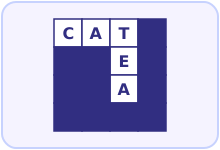
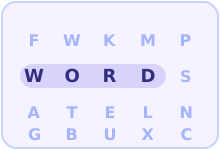
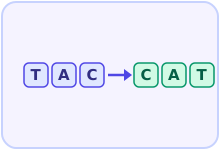
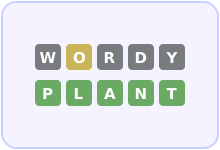

Word puzzles: crosswords, word searches, and anagrams.
Each one makes students recall or rebuild the exact spelling of a term, so they fit vocabulary-heavy topics.
Matching, sorting, and sequencing
These ask students to connect or order pieces of information, which suits topics with categories or steps.
- Matching: pair a term with its definition, a date with an event, or a country with its capital.
- Sorting: group items into categories, such as sorting animals into mammals, birds, and reptiles.
- Sequencing: put steps in the right order, such as the stages of the water cycle or the steps of an experiment.
Tools like Quizlet and Wordwall build these as drag-and-drop activities, but index cards on a desk work just as well.
Simulation and sandbox games
Simulations let students act inside a model of a real system and see what their choices do.
- City and management games (SimCity-style): students balance a budget, plan transport, and watch the effects, which suits geography, economics, and civics.
- PhET interactive simulations: free science and maths simulations where students change variables and watch the result, such as circuits, forces, or gas laws.
- Minecraft Education: students build and explore in a shared world, used for everything from history reconstructions to coding and chemistry.
These suit problem-solving and longer tasks. Set a clear goal so the play stays tied to the learning.

Act inside a model of a real system and see the result of their choices.
They change variables or make decisions and watch the effects, which connects theory to practice.
Escape rooms and breakout activities
A classroom escape room hides a series of clues that students must solve to “unlock” the next step. Each clue is a question or puzzle from the topic. Digital versions use a locked Google Form; physical versions use a locked box with a number padlock.
Students work in small groups, so the activity builds teamwork as well as content knowledge. Use it to review a whole unit, since you can mix question types into one chain of clues.
Review games: board and card style
Borrow the format of a familiar game and fill it with course content.
- Board-style review: a Snakes and Ladders or trivia board where each square asks a question. Right answers let the team move forward.
- Card games: a matching pairs game, a “Go Fish” style game pairing terms with meanings, or a question deck students draw from.
- Bingo: students fill a grid with key terms; the teacher reads definitions and students mark the matching term.
These need almost no technology and work well when devices are limited.

They run on paper and a familiar game format, with no screens needed.
Students already know the rules, so the lesson time goes to the questions, not to learning the game.
Subject-specific examples
Some games are built for one subject and map directly onto its skills.
- Maths: drill games that practise number facts against a timer, or Prodigy, where solving maths problems drives an adventure game.
- Geography: a map quiz like Seterra, where students click countries, capitals, or rivers, building map knowledge through repetition.
- Coding: block-based puzzles in Scratch or Blockly, and the puzzles on Code.org, where students drag blocks to move a character and learn sequence, loops, and logic.

Drag-and-drop blocks that snap together.
Students build sequences, loops, and conditions without worrying about typing syntax, so the focus stays on the logic.
Low-tech and offline puzzles
No devices are needed for many strong games. Printed crosswords and word searches, card sorts, dice games for number practice, bingo, and “odd one out” puzzles all run on paper. These keep a lesson moving when the internet is down, when devices are shared, or when you want students away from screens for a while.
How was this article?